Beats vs Razer Headphones: Which Brand Fits You?
As an Amazon Associate we earn from qualifying purchases. Links on this page are affiliate links.
Choosing between beats vs razer headphones depends on your primary use case. Both brands offer wireless options with 40-hour battery life and Bluetooth connectivity. However, the Beats Studio Pro focuses on immersive spatial audio and adaptive noise cancellation for general listening. In contrast, the Razer Barracuda prioritizes gaming performance with dual wireless modes and specialized acoustic drivers. You need to decide if you value media immersion or low-latency gaming features more.
Key differences
| Aspect | Beats Studio Pro Wireless ANC Headphones | Razer Barracuda Wireless Gaming Headset |
|---|---|---|
| Connectivity | Class 1 Bluetooth, USB-C | 2.4 GHz, Bluetooth, USB-C |
| Noise Cancellation | Active Noise Cancelling, Transparency | Integrated beamforming noise-canceling mic |
| Audio Features | Lossless Audio, Spatial Audio | Razer Triforce 40mm drivers |
| Recommended Use | Music, Calls | Gaming, Music |
| App Support | Not listed | Razer Audio App |
Which one should you choose?
Choose Beats Studio Pro Wireless ANC Headphones if
- You want adaptive noise cancellation and transparency mode for daily commutes.
- You prefer lossless audio via USB-C and personalized spatial audio.
- You need seamless one-touch pairing with Apple and Android devices.
Choose Razer Barracuda Wireless Gaming Headset if
- You need to switch instantly between PC and mobile via 2.4 GHz and Bluetooth.
- You prioritize gaming immersion with specialized 40mm driver technology.
- You want to customize EQ and mic settings using the Razer Audio App.
Verdict: Choose the Beats Studio Pro if you prioritize high-fidelity music listening and active noise cancellation for travel. Pick the Razer Barracuda if you need versatile connectivity for gaming across multiple devices. Both offer long battery life, but their audio focuses differ significantly.
Beats Versus Razer Headphones Showdown
Noise cancellation type
The Beats Studio Pro offers two distinct listening modes: fully-adaptive Active Noise Cancelling and Transparency mode. This allows you to choose between blocking out the world or hearing your surroundings. The Razer Barracuda focuses on call clarity rather than ambient isolation. It uses an integrated beamforming noise-canceling microphone with dual hidden microphones to suppress background noise during calls. It does not list ambient noise cancellation for music listening. If you need to silence your environment, the Beats option is superior. For clear voice transmission in noisy areas, the Razer mic design is effective.
Connectivity options
Both headsets provide wireless convenience via Bluetooth. The Beats Studio Pro connects using Class 1 Bluetooth and supports lossless audio via USB-C. This USB-C link allows for high-fidelity wired listening without compression. The Razer Barracuda offers a more versatile wireless setup with 2.4GHz and Bluetooth modes. Its SmartSwitch technology lets you instantly toggle between a PC or console via 2.4GHz and a phone via Bluetooth. Both use USB-C for charging. The Razer provides dual wireless paths for gaming and mobile, while the Beats prioritizes high-quality audio transfer via its wired USB-C option.
Audio features
The Beats Studio Pro emphasizes immersive listening through Personalized Spatial Audio with dynamic head tracking. This places you at the center of a 360-degree experience. It also supports lossless audio via USB-C and includes three built-in sound profiles to tailor the listening experience. The Razer Barracuda relies on patented Razer TriForce 40mm drivers. This three-part driver design aims to separate highs, mids, and lows for deeper gaming immersion. It also includes the Razer Audio App for adjustable EQ and microphone settings. The Beats offers more advanced spatial and lossless features for media consumption.
Microphone quality
Both brands prioritize clear communication. The Beats Studio Pro uses voice-targeting mics that precisely filter background noise to ensure crisp call performance. It also supports on-device controls to activate Siri. The Razer Barracuda features an integrated beamforming noise-canceling microphone. This dual hidden mic setup provides powerful noise suppression for loud indoor and outdoor environments. While the Beats focuses on general voice clarity and smart assistant integration, the Razer design is optimized for suppressing significant background interference during calls. Both ensure you are heard clearly, but the Razer emphasizes suppression in noisy settings.
Recommended use
The Beats Studio Pro is designed for general listening, music, and calls. Its features like spatial audio and lossless support cater to media consumers. The Razer Barracuda is explicitly recommended for gaming and music. Its 2.4GHz connectivity targets low-latency performance for PC and console gaming. The TriForce drivers enhance gaming immersion. While the Razer works for music, its hardware and software are tuned for gaming scenarios. If your primary activity involves playing games on a computer or console, the Razer Barracuda is the more suitable choice. For general entertainment and calls, the Beats is more versatile.
Which Beats Or Razer Headphones Suit You
You want lossless audio and spatial sound
The Beats Studio Pro supports lossless audio via USB-C, ensuring high-fidelity playback. It also features personalized spatial audio with dynamic head tracking for a 360-degree experience. If you prioritize immersive music details and Apple ecosystem compatibility, this model delivers the rich, customizable sound profile you need for daily listening.
You game on PC or console
The Razer Barracuda includes Razer SmartSwitch technology to instantly toggle between 2.4GHz and Bluetooth. This allows seamless switching between your gaming PC or console and mobile devices. Its dedicated gaming focus and TriForce 40mm drivers provide clearer positional audio, making it the practical choice for low-latency gaming sessions.
You need long battery life with fast charge
Both headsets offer 40 hours of battery life, but the Beats Studio Pro includes a Fast Fuel feature. A 10-minute charge provides up to 4 hours of playback. This rapid charging capability is useful when you are short on time. You get reliable wireless performance with Bluetooth and USB-C connectivity for extended use.
You prefer lightweight comfort for all-day wear
The Beats Studio Pro weighs only 1.12 ounces, making it significantly lighter than the Razer option. This reduced weight minimizes pressure during long listening sessions. While the Razer uses memory foam, the Beats design offers a lighter alternative. You benefit from on-ear controls and voice-targeting mics without the bulk of heavier gaming hardware.
The products compared

Beats Studio Pro Wireless ANC Headphones
Best for: Long battery life and lossless audio
- Noise Cancellation
- Active Noise Cancelling, Transparency
- Battery Life
- Up to 40 hours
- Connectivity
- Class 1 Bluetooth, USB-C
- Audio Features
- Lossless Audio, Spatial Audio
- Dimensions
- 3.07 × 7.13 × 7.01 inches
- Weight
- 1.12 ounces
View on Amazon: Beats Studio Pro Wireless ANC Headphones Affiliate link
The Beats Studio Pro offers up to 40 hours of battery life and supports lossless audio via USB-C. It features Class 1 Bluetooth for stable wireless connections and includes adaptive Active Noise Cancelling alongside Transparency mode. This model delivers personalized spatial audio with dynamic head tracking. You will find these headphones suitable if you need long listening sessions and clear call performance with voice-targeting mics.
Pros
- Up to 40 hours total battery life
- Lossless audio via USB-C connection
- Adaptive Active Noise Cancelling and Transparency mode
- Personalized spatial audio with dynamic head tracking
- Voice-targeting mics for clear calls
Cons
- Lacks 2.4GHz wireless connectivity for low-latency gaming
- No dedicated companion app for EQ customization
- No wired audio jack for direct connection
Good fit if
- You want lossless audio quality over USB-C
- You need 40 hours of battery life
- You use both Apple and Android devices
Skip if
- You require 2.4GHz wireless for gaming
- You prefer wired-only connections
- You need customizable EQ via an app
Verdict: Beats Studio Pro Wireless Headphones provide strong battery life and lossless audio support, making them a solid choice for users prioritizing wireless convenience and long playback time.
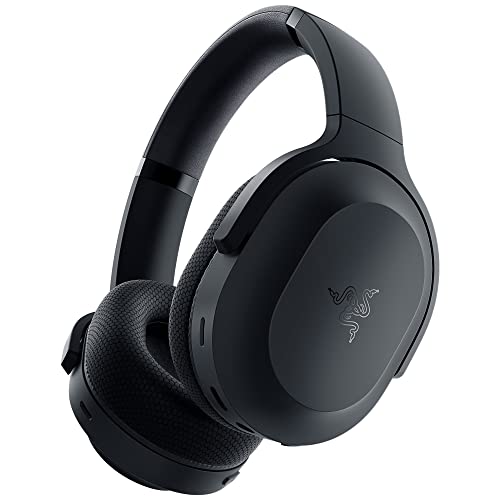
Razer Barracuda Wireless Gaming Headset
Best for: Gamers needing dual wireless connectivity
- Battery Life
- 40 hours
- Connectivity
- 2.4 GHz, Bluetooth, USB-C
- Driver Size
- 40 mm / 50 mm
- Recommended Use
- Gaming
- Dimensions
- 6.66 × 8 × 3.62 inches
- Weight
- 10.4 ounces
View on Amazon: Razer Barracuda Wireless Gaming Headset Affiliate link
The Razer Barracuda is a wireless headset designed for gaming and mobile use. It features Razer SmartSwitch to toggle between 2.4GHz and Bluetooth connections. The 40mm TriForce drivers deliver distinct audio layers. You get 40 hours of battery life with USB-C charging. FlowKnit memory foam cushions keep your ears cool during long sessions. This model suits gamers who also listen to music on their phones.
Pros
- Dual wireless connectivity via 2.4GHz and Bluetooth
- 40-hour battery life with USB-C charging
- TriForce 40mm drivers for clear highs, mids, and lows
- FlowKnit memory foam ear cushions for breathability
- Integrated beamforming noise-canceling microphone
Cons
- Heavier build at 10.4 ounces
- No active noise cancellation for listening
- Requires Razer Audio App for full customization
Good fit if
- You need one headset for both PC gaming and mobile use
- You prefer memory foam cushions that minimize heat buildup
- You want long battery life for all-day sessions
Skip if
- You require active noise cancellation for listening
- You prefer lighter headsets under 10 ounces
- You want to control settings without a companion app
Verdict: Razer Barracuda Wireless Headset offers versatile dual-mode connectivity and long battery life for gamers who also use mobile devices. It fits users who prioritize comfort and audio clarity over active noise cancellation.
Specifications side by side
| Spec | Beats Studio Pro Wireless ANC Headphones | Razer Barracuda Wireless Gaming Headset |
|---|---|---|
| Noise Cancellation | Active Noise Cancelling, Transparency | not stated |
| Battery Life | Up to 40 hours | 40 hours |
| Connectivity | Class 1 Bluetooth, USB-C | 2.4 GHz, Bluetooth, USB-C |
| Driver Size | not stated | 40 mm / 50 mm |
| Audio Features | Lossless Audio, Spatial Audio | not stated |
| Recommended Use | not stated | Gaming |
| Dimensions | 3.07 × 7.13 × 7.01 inches | 6.66 × 8 × 3.62 inches |
| Weight | 1.12 ounces | 10.4 ounces |
| Size | One Size | Standard |
| Color | Navy | Classic Black |
| Model | 657768614163 | RZ04-03790100-R3U1 |
Frequently asked questions
Do Beats Studio Pro headphones support lossless audio?
Yes, the Beats Studio Pro supports lossless audio. You can connect the headphones via USB-C to enjoy high-fidelity playback without compression. This feature ensures you hear the music exactly as the artist intended, providing a superior listening experience for critical audio consumers.
Is the Razer Barracuda headset good for gaming?
The Razer Barracuda is designed specifically for gaming. Its recommended use is gaming, and it features dual-mode connectivity. This allows you to switch between Bluetooth for mobile devices and a wireless dongle for low-latency gaming on your console or PC.
Which headphones are lighter, Beats or Razer?
The Beats Studio Pro is significantly lighter. It weighs only 1.12 ounces, making it very comfortable for extended wear. In contrast, the Razer Barracuda weighs 10.4 ounces. The substantial weight difference may affect comfort during long listening or gaming sessions.
Do Beats Studio Pro headphones have spatial audio?
Yes, the Beats Studio Pro features personalized spatial audio. It includes dynamic head tracking to create a 360-degree sound experience. This technology places sound around you, enhancing immersion for movies, games, and music when you move your head.
Can I use the Razer Barracuda with my phone?
Yes, the Razer Barracuda works with mobile devices. It offers Bluetooth connectivity, allowing you to pair it with your smartphone for calls or music. The dual wireless design ensures you can seamlessly switch between your gaming setup and your mobile device.
What colors are available for these headphones?
The Beats Studio Pro is available in Navy. The Razer Barracuda comes in Classic Black. These are the specific color options listed for each model, allowing you to choose based on your preferred aesthetic.
Do these headphones connect via Bluetooth?
Both models support Bluetooth connectivity. The Beats Studio Pro and the Razer Barracuda both offer wireless connections. This allows you to pair them with your devices without the need for cables, providing freedom of movement while listening.