Bose vs Razer: Headphones Compared by Specs
As an Amazon Associate we earn from qualifying purchases. Links on this page are affiliate links.
When comparing bose vs razer headphones, you are looking at two distinct approaches to wireless audio. Both brands offer over-ear designs with Bluetooth connectivity and companion apps for customization. The main difference lies in their intended use and battery performance. Bose focuses on noise cancellation for general listening, while Razer targets gamers with dual wireless modes and longer playtime. This guide breaks down the specific specifications to help you decide which fits your routine.
Key differences
| Aspect | Bose QuietComfort Wireless Over-Ear Headphones | Razer Barracuda Wireless Gaming Headset |
|---|---|---|
| Form Factor | Over-ear | Over-ear |
| Battery Life | Up to 24 hours | 40 hours |
| Connectivity | Bluetooth Multipoint, wired | 2.4 GHz, Bluetooth, USB-C |
| Noise Cancellation | Quiet and Aware Modes | not listed |
| Microphone | In-line microphone (wired) | Integrated beamforming noise-canceling mic |
| Recommended Use | not listed | Gaming |
Which one should you choose?
Choose Bose QuietComfort Wireless Over-Ear Headphones if
- You prioritize active noise cancellation to block out ambient sounds during travel or work.
- You need to switch seamlessly between two Bluetooth devices without reconnecting.
- You prefer a wired connection option for when the battery is depleted.
Choose Razer Barracuda Wireless Gaming Headset if
- You need longer battery life for extended gaming or work sessions.
- You want to connect to a PC or console using a low-latency 2.4 GHz dongle.
- You require a dedicated microphone with noise suppression for clear voice communication.
Verdict: The Bose QuietComfort is better for users who need strong noise cancellation and multi-device Bluetooth switching for general listening. The Razer Barracuda suits gamers and heavy users who need longer battery life and a dedicated 2.4 GHz connection for low-latency audio. Choose based on whether your priority is isolation or gaming performance.
Bose vs Razer Headphones Compared
Noise cancellation type
Bose QuietComfort Wireless Over-Ear Headphones offer two distinct listening modes: Quiet and Aware. Quiet mode provides full noise cancellation to shut out distractions, while Aware Mode lets you hear your surroundings. This dual approach gives you control over your acoustic environment. Razer Barracuda Wireless Gaming Headset does not list active noise cancellation for audio playback. Instead, it focuses on an integrated beamforming noise-canceling microphone. This feature suppresses background noise for your voice during calls or gaming chats. If your priority is silencing the world around you, Bose provides the necessary technology. Razer leaves this aspect unlisted for media listening.
Battery life
Battery performance is a key differentiator between these two headsets. The Razer Barracuda Wireless Gaming Headset offers up to 40 hours of battery life on a single charge. It also supports USB-C charging for convenient power replenishment. This duration allows for more than a full day of continuous gaming or work. The Bose QuietComfort Wireless Over-Ear Headphones provide up to 24 hours of battery life on one charge. They do offer a quick charge feature, where 15 minutes of charging yields 2.5 hours of playback. For users who prioritize maximum uninterrupted listening time without frequent recharging, the Razer option is superior.
Connectivity
Both headsets support Bluetooth and include companion apps for customization. However, their connectivity options differ in scope. The Bose QuietComfort Wireless Over-Ear Headphones feature multipoint Bluetooth, allowing you to stay connected to multiple devices and switch between them without disconnecting. They also include a wired option via an included audio cable with an in-line microphone. The Razer Barracuda Wireless Gaming Headset adds a 2.4GHz wireless connection option. This allows for instant switching between a PC or console and a mobile device. This dual wireless capability is particularly useful for gamers who move between platforms.
Audio features
Audio customization and driver design vary significantly between the two brands. Bose QuietComfort Wireless Over-Ear Headphones feature high-fidelity audio with adjustable EQ controls. You can manage bass, mid-range, and treble levels directly through the Bose app to tailor the sound to your preference. The Razer Barracuda Wireless Gaming Headset utilizes patented Razer Triforce 40mm drivers. This three-part driver design aims to deliver exceptional highs, mids, and lows without muddying audio quality. It is designed for deeper gaming immersion and dynamic listening. While Bose focuses on broad EQ adjustment, Razer emphasizes specialized driver architecture.
Comfort and build
Comfort features are detailed for both headsets, though materials differ. The Bose QuietComfort Wireless Over-Ear Headphones use plush earcup cushions that softly hug your ears. They feature a secure and comfortable padded band designed for extra-long listening sessions. The Razer Barracuda Wireless Gaming Headset employs ultra-soft Flowknit memory foam ear cushions. This breathable weave surface is designed to minimize heat build-up, providing plush cushioning for all-day use. Bose weighs 8.4 ounces, while the Razer headset weighs 10.4 ounces. Both prioritize long-term wearability, but Razer specifically addresses thermal comfort with its breathable material.
Which one should you buy?
Travelers needing silence and long battery
The Bose QuietComfort offers 24 hours of battery life on a single charge. It includes a quick charge feature providing 2.5 hours of playback from just 15 minutes. The Quiet and Aware modes let you control your environment. This makes it ideal for long flights or commutes where consistent noise cancellation is essential.
Gamers wanting low latency and clarity
The Razer Barracuda features SmartSwitch technology to toggle between 2.4GHz and Bluetooth instantly. This reduces latency for gaming while keeping mobile connectivity. The 40mm TriForce drivers deliver distinct highs, mids, and lows. This driver design ensures clear audio separation, which is critical for spotting enemies in competitive games.
Users needing multi-device seamless switching
Bose QuietComfort headphones support multipoint Bluetooth connectivity. This allows you to stay connected to multiple devices simultaneously without manual reconnection. You can switch between your phone and laptop seamlessly. The wired option also ensures you can use them if the battery dies, providing reliable backup connectivity for work or travel.
The products compared

Bose QuietComfort Wireless Over-Ear Headphones
Best for: Commuters needing noise cancellation and long battery life
- Noise Cancellation
- Quiet and Aware Modes
- Form Factor
- Over-ear
- Battery Life
- Up to 24 hours
- Connectivity
- Bluetooth Multipoint, wired
- Audio Features
- Deep Bass
- Dimensions
- 3.15 × 6.18 × 7.68 inches
View on Amazon: Bose QuietComfort Wireless Over-Ear Headphones Affiliate link
The Bose QuietComfort headphones deliver active noise cancellation with Quiet and Aware modes. You get 24 hours of battery life and multipoint Bluetooth for seamless device switching. High-fidelity audio and adjustable EQ let you tune bass, mid-range, and treble. Plush earcup cushions and a padded band provide comfort for long sessions. A wired option with an in-line mic ensures you can listen even when the battery is depleted.
Pros
- Active noise cancellation with Quiet and Aware modes
- 24-hour battery life with 15-minute quick charge
- Multipoint Bluetooth connectivity
- Adjustable EQ for sound customization
- Wired listening option with in-line microphone
Cons
- Heavier at 8.4 ounces compared to lighter alternatives
- No 2.4GHz wireless connection for gaming latency
- Requires Bose app for software updates
Good fit if
- You want active noise cancellation for travel
- You need multipoint Bluetooth for multiple devices
- You prefer adjustable EQ settings
Skip if
- You need ultra-lightweight headphones under 7 ounces
- You require 2.4GHz wireless for gaming
- You want a wired-only connection without Bluetooth
Verdict: Bose QuietComfort Over-Ear headphones offer robust noise cancellation and 24-hour battery life, making them ideal for commuters who value sound control and comfort over extended listening sessions.
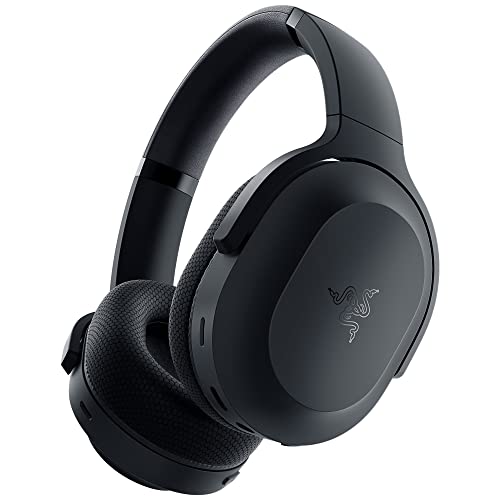
Razer Barracuda Wireless Gaming Headset
Best for: gamers switching between PC and mobile
- Battery Life
- 40 hours
- Connectivity
- 2.4 GHz, Bluetooth, USB-C
- Driver Size
- 40 mm / 50 mm
- Recommended Use
- Gaming
- Dimensions
- 6.66 × 8 × 3.62 inches
- Weight
- 10.4 ounces
View on Amazon: Razer Barracuda Wireless Gaming Headset Affiliate link
The Razer Barracuda is a wireless headset designed for gaming and mobile use. It features SmartSwitch technology to toggle between 2.4GHz and Bluetooth connections. The 40mm TriForce drivers aim for clear audio separation. You get 40 hours of battery life with USB-C charging. The FlowKnit memory foam cushions help reduce heat during long sessions. This model suits players who switch devices often.
Pros
- SmartSwitch allows instant switching between 2.4GHz and Bluetooth
- 40-hour battery life with USB-C charging
- 40mm TriForce drivers with a patented 3-part design
- FlowKnit memory foam ear cushions for breathability
Cons
- Heavier at 10.4 ounces compared to some competitors
- Larger dimensions may not fit smaller head sizes
- Requires the Razer Audio App for full EQ customization
Good fit if
- You need to switch between PC and mobile devices
- You prefer memory foam cushions for comfort
- You want a single headset for gaming and music
Skip if
- You need wired connectivity for zero latency
- You prefer lighter headsets under 9 ounces
- You want built-in EQ controls without an app
Verdict: The Razer Barracuda Wireless Gaming Headset offers versatile connectivity for gamers who switch between platforms. Its 40-hour battery and dual wireless modes make it a solid choice for mixed-device users.
Specifications side by side
| Spec | Bose QuietComfort Wireless Over-Ear Headphones | Razer Barracuda Wireless Gaming Headset |
|---|---|---|
| Noise Cancellation | Quiet and Aware Modes | not stated |
| Form Factor | Over-ear | not stated |
| Battery Life | Up to 24 hours | 40 hours |
| Connectivity | Bluetooth Multipoint, wired | 2.4 GHz, Bluetooth, USB-C |
| Driver Size | not stated | 40 mm / 50 mm |
| Audio Features | Deep Bass | not stated |
| Recommended Use | not stated | Gaming |
| Dimensions | 3.15 × 6.18 × 7.68 inches | 6.66 × 8 × 3.62 inches |
| Weight | 8.4 ounces | 10.4 ounces |
| Size | Regular | Standard |
| Color | Cypress Green | Classic Black |
| Model | 884367-0300 | RZ04-03790100-R3U1 |
Frequently asked questions
Which headphones are better for daily commuting?
The Bose QuietComfort Wireless Over-Ear Headphones are the better choice for commuters. They provide 24 hours of battery life, which reduces the need for frequent charging during long travel days. The deep bass audio feature enhances music enjoyment. Their compact size and lightweight design at 8.4 ounces make them comfortable for extended wear on trains or buses.
Can I use these headphones for gaming?
The Razer Barracuda Wireless Gaming Headset is designed specifically for gaming. It features dual wireless modes that allow you to switch between PC and mobile devices seamlessly. This versatility is ideal for gamers who play on multiple platforms. The headset is built for gaming use, ensuring low latency and clear audio for competitive play or casual sessions.
How long does the battery last on each model?
Battery life varies significantly between the two options. The Bose QuietComfort offers 24 hours of playback time, making it suitable for all-day use without interruption. In contrast, the Razer Barracuda provides up to 40 hours of battery life. This longer duration makes the Razer option particularly useful for users who travel frequently or forget to charge devices often.
What is the weight difference between the two headsets?
The Bose QuietComfort is lighter than the Razer Barracuda. The Bose model weighs 8.4 ounces, which contributes to its comfort during long listening sessions. The Razer headset is heavier at 10.4 ounces. This extra weight comes from its gaming-focused construction and dual wireless capabilities. You should consider which weight preference suits your comfort needs best.
Are both models wireless with Bluetooth connectivity?
Yes, both headphones feature wireless connectivity via Bluetooth. The Bose QuietComfort uses this technology for seamless pairing with your devices. The Razer Barracuda also supports Bluetooth, allowing you to connect to smartphones or tablets. Both models enable you to enjoy audio without tangled wires, providing freedom of movement while maintaining a stable connection to your source device.
Which headphones are best for travelers who need silence?
Travelers seeking silence should choose the Bose QuietComfort. These headphones offer robust noise cancellation features that help shut out ambient noise. The 24-hour battery life ensures they last through long flights or train rides. Their over-ear design provides physical isolation, while the wireless connectivity allows you to listen to music or podcasts without distractions during your journey.
Do these headphones support mixed-device usage?
The Razer Barracuda is optimized for mixed-device usage. It supports dual wireless modes, allowing you to connect to a PC and a mobile device simultaneously. This feature is ideal for gamers who switch between platforms. The Bose QuietComfort focuses on single-device audio quality with its deep bass and noise cancellation. It does not emphasize multi-device switching in its specifications.